2022-06-27
Keying the world.
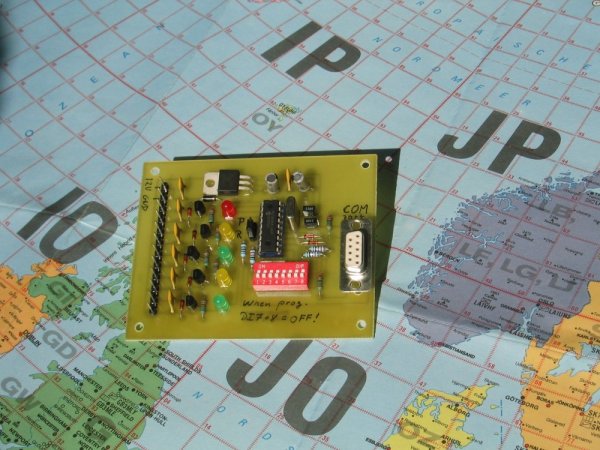
Home call sign or service call sign, e.g. OZ7IGY and OZ7IGY/A.
Optional home locator or service locator, e.g. JO55WM and JO65ER.
Optional extra message that can be used to indicate propagation, e.g. "AUR".
Optional Opera digital message, home call sign, for increased S/N-performance.
Easy change of call signs, locators and extra message in the software.
Instead of sending a key down "message" it is possible to send "Last letter ID."
Variable duty cycle, 100% or 50%, to save power.
Keying all outputs synchronously or asynchronously, i.e. one at a time in order to minimise the load difference on the power supply.
Enabling a RX period for monitoring the beacon frequency.
DIP switch controlled message and functions.
Software and microcontroller offer room for many more features.
You can also take a look at the RFzero GPS controlled RF source for.
| DIP | Function | On | Off |
| 1 | Normal/Service operation | Service | Normal |
| 2 | Send locator | No | Yes |
| 3 | Send Opera | Yes | No |
| 4 | Duty cycle | 50% | 100% |
| 5 | Last letter ID* | Send LLID | Send carrier |
| 6 | Extra message | Send extra message | No extra message |
| 7 | RX pause | Yes | No |
| 8 | Keying | Sequenced | All keyed output |
*: overrides duty cycle.
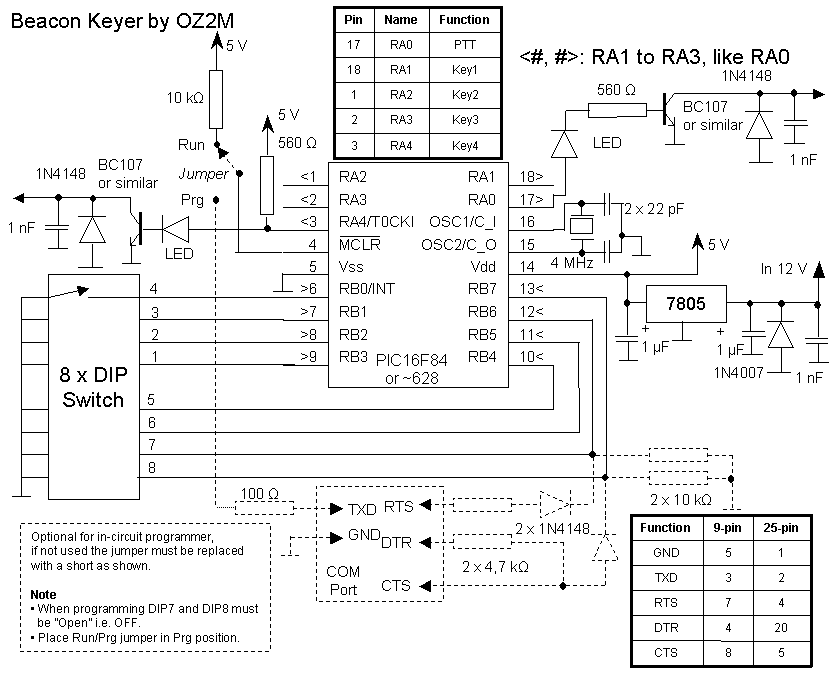
The easiest way to connect the beacon keyer to a RS-232 interface is by using a straight serial cable, i.e. pin 1 to pin 1 etc.
Download the necessary software and PCB files here, courtesy Mathias, DH4FAJ, Bent, OZ1CT and Jens Ole, OZ9ZZ.
| Component | Value | Notes |
| R1, R2 | 4,7 kΩ | Use only 4,7 kΩ |
| R3, R4, R5 | 10 kΩ | |
| R6 | 100 Ω | Use only 100 Ω |
| R7, R8, R9, R10, R11 | 560 Ω | May be increased to reduce the light from the LEDs |
| C1, C2 | 22 pF | Use only 22 pF |
| C3, C4 | 1 µF, 25 V | |
| C5, C6, C7, C8, C9, C10, C11 | 1 nF | |
| D1, D2, D3, D4, D5, D6, D7 | 1N4148 | |
| D8 | 1N4001 | |
| D9, D10, D11, D12, D13 | LED 5 mm | |
| I1 | 7805 | |
| I2 | PIC16F84(A) or PIC16F628(A) | Use the cheapest one you can get. The 4 MHz versions are perfect |
| Q1, Q2, Q3, Q4, Q5 | BC337 | Most small signal low cost transistors will do provided pin layout matches |
| S1 | 9 pin D-sub female | |
| S2 | 8 positions DIP switch | Alternatively solder shorts manually |
| S3 | 3 pin header | |
| S4 | 2 pin jumper | Must match with S3 |
| S5 | 23 pin header | Alternatively solder wired directly to the PCB |
| X1 | Crystal, max 4 MHz or 20 MHz for ~A type MCU | Most low cost crystals will work. A low PPM value is best for Opera |
| Z1 | 18 pin DIL socket | May be omitted if I2 is soldered directly to the PCB |
5B4CY 9M4VI A92C/B BG6CJR/B CE3DNP CN8MC CU8DUB DB0AD DB0MMO DJ5UP DL1GBF EA1URL EA2TZ EA5URB EA5YB ED1YAQ ED5YAE ED6YAE ED7YAD E73SIX F5ABC F5ZAL F5ZAN F5ZAS F5ZIE F5ZIF F5ZIJ F5ZIK F5ZFS F5ZRV F5ZSG F5ZVJ F5ZXV F6HTG HB9G IK1HGI IT9GRR/B IU0CIX IW0EAC/B IW4EHZ IW9EZO IZ4PSG/B JW9SIX K8EB/B KN8DMK LA3SHF LA5VHF LA9SIX LA9TEN LX0FOUR LZ0SJB OE5QL OK0EA OK0EE ON7GE OM2CS OX4MB OY6BEC OZ1JXY/B OZ4UHF PP2BCN PS8RF PS8RR/B S52RF SK6QW/B SQ1KSM SR6DWC SR8FHJ SR8FHS SR8VHS SV2DCD/B SV2JL/B SV2MCG/B SV5VHF SV9TEN/B YB6AR YM7TEN/B YV6CR ZS3SVD ZS6SIX
With the microPascal compiler you can make your own .hex file or modify the code to suit your needs.
You can also take a look at the RFzero GPS controlled RF source for.
The purpose of this section is to describe what it takes to put a beacon on the air both the legal issues and the equipment.
Before you can put a beacon on the air several steps have to be performed.
Issues concerning the licensing is entirely up to you and your licensing authority. Before you begin you might want to read the IARU Region 1 VHF Committee guide lines.
Selecting a location if often the most difficult task. When evaluating a location the following parameters should be considered:
Choosing an operating frequency is more than finding a vacant frequency in your neighbourhood. The frequency, that you at first glance think is free, might be occupied elsewhere and the sole purpose of operating a beacon is to make it possible for others to monitor it. Therefore the frequency must be clear in the entire area the beacon is to cover at least 99% of the time.
The best, and perhaps only, way to get an operating frequency is to contact the frequency allocation manager for beacons, either nationally or at IARU regional level.
Table 1. Frequency tolerance and spacing. Source: IARU Region 1 VHF Committee.
| Band | 50 MHz | 70 MHz | 144 MHz | 432 MHz | 1,3 GHz |
| Frequency tolerance [ppm] | 4 | 2,8 | 1,4 | 1,0 | 0,8 |
| Frequency tolerance [Hz] | 200 | 200 | 200 | 400 | 1000 |
| Spacing between beacons [kHz] | 1 | 1 | 1 | 1 | 2-3 |
The next step is to get the necessary hardware which consists of:
The power supply, feeder cable, connectors and antenna(s) are assumed to be know stuff already. There are a number of ways to make the beacon hardware:
The cheapest way, and perhaps also best, is to get hold of an old land mobile base station. It offers the robustness required for a continuously operated beacon. A typical amateur radio station is not made for 24 hours of operation day after day.
Even if the radio is only made for FM it can be a perfect beacon. In fact most beacons are former land mobile FM radios. However, do not consider to audio modulate a FM beacon with a e.g. 1 kHz tone. This will generate a lot of side bands taking up a lot of bandwidth and will also reduce the power on the actual (carrier) operating frequency.
In order to save power, keeping the temperature down and the stress of the power amplifier the duty cycle of the keydown period may be reduced to e.g. 50%, sending a series of "E." However, experience shows that the output transistor(s) do not last longer. In fact they are prone to reduced life time due to thermal and current stress in the wire bondings. In order to prolong the life time of the equipment keep the temperature constant and below 40°C.
In order to key the beacon from the beacon keyer the modulation principle, CW or FSK, must be decided upon as it affects the keying circuit in the radio. Below are two schematic examples of CW and FSK keying.
Figure 1. CW keying of the beacon.
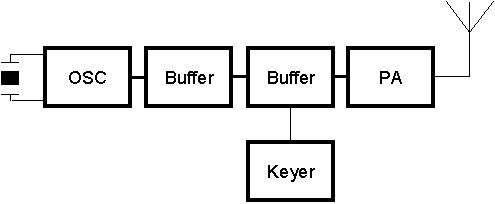
When keying the beacon in CW mode the carrier must be switched on and off. The best way to do this is as early in the TX chain as possible as this makes the switching of the actual transistor easier. On the other hand switching the oscillator on/off may result in a situation where the oscillation will not start and the frequency will become very instable. Keying the subsequent buffer stage will most likely result in chirp as the load impedance of the buffer stage changes whereby the oscillator is loaded differently during on/off. Therefore a later buffer stage with more isolation towards the oscillator is the best place, e.g. the second buffer stage.
Figure 2. FSK keying of the beacon.
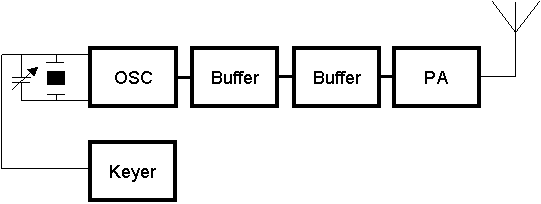
When keying the beacon in FSK mode the carrier frequency is subject to a slight change made by switching in/out an additional capacitance in connection with the crystal.
Table 2. Frequency shift. Source: IARU Region 1 VHF Committee.
| Band | 50 MHz | 70 MHz | 144 MHz | 432 MHz | 1,3 GHz |
| F1A frequency shift [Hz] | 250 | 250 | 400 | 400 | 400 |
| Frequency at "space" [Hz] | nominal - 250 | nominal - 250 | nominal - 400 | nominal - 400 | nominal - 400 |
How the actual beacon keying is made depends entirely on the available radio.
Bo, OZ2M, www.rudius.net/oz2m